
Giving Credit Online: How to Find an Image's Creator
Trace an image to its original creator, check credits and metadata, confirm reuse rights and write accurate attribution without guesswork.
A picture of a very stern-looking goose appears in your feed. You would like to share it, and the uploader has provided a helpful caption: "Found this online." An intriguing biography for the goose, but not much use for identifying the photographer.
Finding the creator of an image can take real detective work. Social platforms encourage reposting, screenshots remove context and watermarks may belong to accounts that republished the picture rather than the person who made it.
Start with the page where you encountered it
Record the URL, username, date and any visible credits on the post. If a person shared the image, check whether they describe themselves as its creator or mention where it came from.
Follow links to a portfolio, website or older post. Compare dates and versions, but avoid treating the earliest result you find as conclusive proof of authorship.
A source can be useful without being original. A photographer's work may appear in a news article after appearing on their own website. A social account may repost with permission and display the license information clearly.
Your goal is to trace the picture toward a reliable origin. You are not required to solve every mystery instantly. The goose has apparently been waiting for years.
Search using the image itself
Reverse-image search can reveal visually similar images and pages where a file appears. Start with an unmodified version when possible, because captions, cropping and filters can make matching harder.
Try more than one search service if results are sparse. Use the image's distinctive subjects or any unusual background details as supplementary text queries.
Look for higher-resolution copies, older pages, original file names and portfolios connected to the work. None of these clues alone proves ownership, but several consistent details can make a source more credible.
Google's guidance on finding image details explains that credit, creator and copyright information may appear when owners provide it or when relevant metadata accompanies the image.
Treat the results as clues, not a courtroom verdict. Search rankings are based on many factors besides who pressed the camera button.
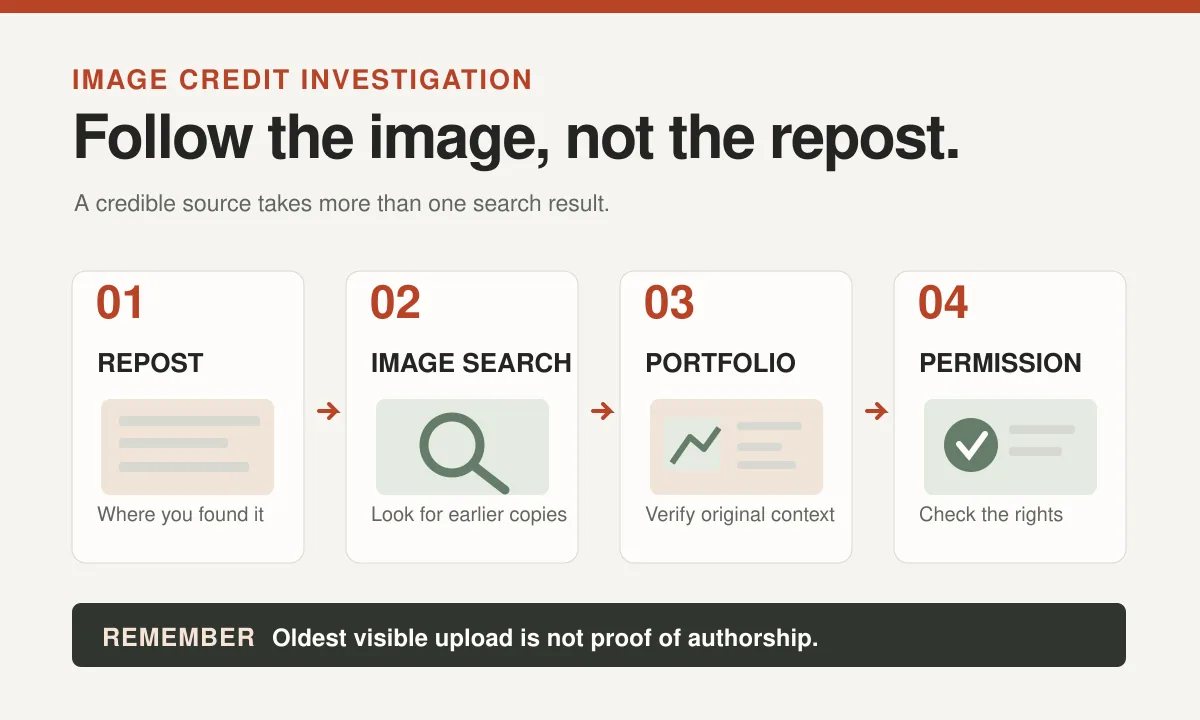
Follow the trail through reposts
A viral image may have appeared on a forum, an image board, a meme account and several messaging channels before reaching you.
Check for comments naming an earlier source, links to the photographer or a caption copied from another platform. Search those names and phrases carefully.
A watermark can help, but it isn't proof of authorship. Some accounts add their own branding to pictures they did not create. A repost may also remove an original watermark, which complicates the trail.
Look for evidence that the supposed creator has posted related images from the same session or offers the work in a portfolio. Context is valuable: a full series of animal photographs may be more persuasive than a single isolated screenshot.
If the source remains unclear, document that uncertainty. Don't solve it by inventing a credit line that sounds official.
Check file metadata when you can
Some images contain embedded information about the photographer, rights holder, license or editing history. One common metadata standard is IPTC, used in professional photography workflows.
Google notes that its image information can draw on IPTC credit and copyright fields, when that data is available.
Metadata can help, but it is not infallible. Files can be exported without the original fields, copied with outdated information or deliberately modified. A missing field doesn't mean the image has no creator.
Check what the metadata says against the source page and any license details. If they disagree, investigate rather than choosing whichever version is easiest to publish.
Also remember that technical metadata describing how an image was generated or edited is not, by itself, a complete rights agreement.
| Clue | What it can tell you | What it cannot prove |
|---|---|---|
| Image search matches | Where similar copies appear | Who created the image |
| IPTC credit fields | A possible author or rights holder | That the metadata is genuine or current |
| Original portfolio | Work presented in creator context | That your intended reuse is licensed |
| Repost watermark | Which account circulated a copy | That the account owns the copyright |
Separate attribution from permission
Finding the photographer is a useful first step. It does not automatically mean you have permission to download, edit and republish the image.
The UK Intellectual Property Office guidance on using copyright material explains that a license, permission or a relevant legal exception is generally needed for protected works.
You may be able to link to an authorized original post without hosting a copy of the file yourself. But copying and redistributing the image raises separate questions.
If you need to make a meme from somebody else's photograph, check whether editing and republication are allowed. Ask the rights holder when the terms are unclear.
Our article on checking whether an image is safe to reuse covers that decision in more detail.
Give useful credit when the terms require it
A credit line should help readers identify the creator and locate the original work. "Image from the internet" is not a credit. It is a diagnosis.
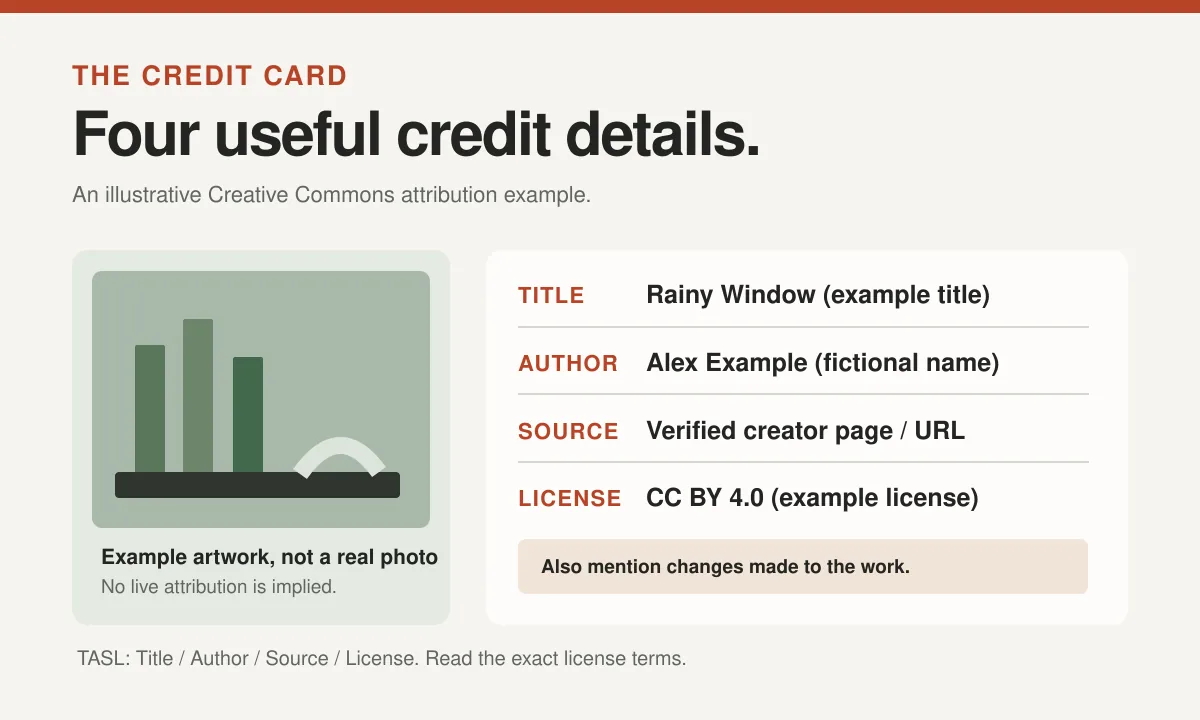
For Creative Commons images, the recommended TASL approach includes the title, author, source and license. The Creative Commons reuse guide also advises indicating changes where applicable.
A hypothetical attribution might read: "Photo 'Rainy Window' by Alex Example, licensed under CC BY 4.0, cropped and captioned for this post." In a real publication, replace every part with verified information and link to the actual source and license.
Different licenses may require additional notices or restrict adaptation or commercial use. Don't copy a template without checking what applies.
Attribution practices should suit the medium while retaining the essential information. A linked credit near the image may be practical on a website; a printed poster may need a different layout.
What if the image has no identifiable author?
Sometimes the trail ends with several reposts and no reliable original source. Don't treat "unknown" as an invisible license.
You can try contacting a plausible source and asking for provenance. You can also look for a similar image in a reputable library with explicit reuse terms.
If you can't establish authorization and no applicable exception clearly covers the use, choosing another visual is usually the sensible editorial decision.
You might be able to create your own photo, commission an illustration or make an image based on an original idea without copying the unknown work. See our guide to creating funny visuals without using someone else's face.
The joke can survive changing the image. The goose need not be summoned as an unwilling legal witness.
Keep a small provenance record
For teams publishing many images, write down the information while researching it. Future editors may not remember how an asset entered the library.
A practical record can include the original URL, creator name, image title, license link, permission date, allowed uses, any required credit text and the location where the asset is published.
If an image was modified, note the change. If direct permission was given by email, store the authorization securely with the relevant project files.
This is especially helpful when an image appears on several pages or gets reused in a new context. An old permission might cover a blog illustration but not a product printed for sale.
A consistent process makes it easier to update credits when a creator provides new information or identifies an error.
Be careful when crediting people publicly
Avoid sharing a private individual's personal contact information in the name of attribution. Use the professional name or identity the creator has chosen for public credit.
If a creator uses a pseudonym, respect it. Credit should not become an excuse to investigate a person's private identity.
A creator may also request a correction. Respond constructively, review the supporting information and amend the credit or remove the image if needed.
The website's own image-rights and credits page can provide a central place to explain how attribution concerns are handled.
Good credit makes the internet more useful
Attribution can help an audience discover the artist, photographer or creator responsible for the work. It also makes your own publication more transparent.
It isn't a substitute for permission. It isn't always required by every license or public-domain situation. And it shouldn't invent a photographer when evidence is missing.
A good workflow is simple to remember: locate, verify, check the reuse terms, record the evidence and credit according to the actual requirements.
If the trail leads back to the stern goose's photographer, give the person proper acknowledgment. The goose will probably continue looking disapproving regardless, which is precisely why the picture was tempting in the first place.