
Meme vs. GIF: How to Choose the Right Reaction
Choose between static memes and animated GIFs based on comic timing, readability, motion, accessibility and the conversation.
Your friend has just sent a message describing an utterly improbable misunderstanding at a restaurant. You could answer with a still picture of a stunned cat, or you could send a GIF of a character slowly turning toward the camera in disbelief. Both are technically reactions. Only one may have the patience for your friend's particular story.
The meme-versus-GIF decision isn't about which format is objectively funnier. It is about timing, movement, readability and the people who are about to receive your reply.
What actually separates a meme from a GIF?
A meme is an idea or format that people copy, adapt and share. It might be a still image with a caption, an animated clip or another recognizable piece of internet culture. A GIF is a file format that supports animation, although some GIF files are static.
In ordinary conversation, people often use "meme" to mean a captioned still image and "GIF" to mean a short looping reaction. That is the useful distinction for choosing what to send, even though the categories overlap.
The format doesn't guarantee the joke. A static photograph of a disappointed pigeon can communicate a full emotional performance. An elaborate animation might simply distract everyone from the original message.
Our reaction meme collection offers examples of expressions that work without motion. A single, perfectly chosen face can be an entire reply.
Choose a still image when speed matters
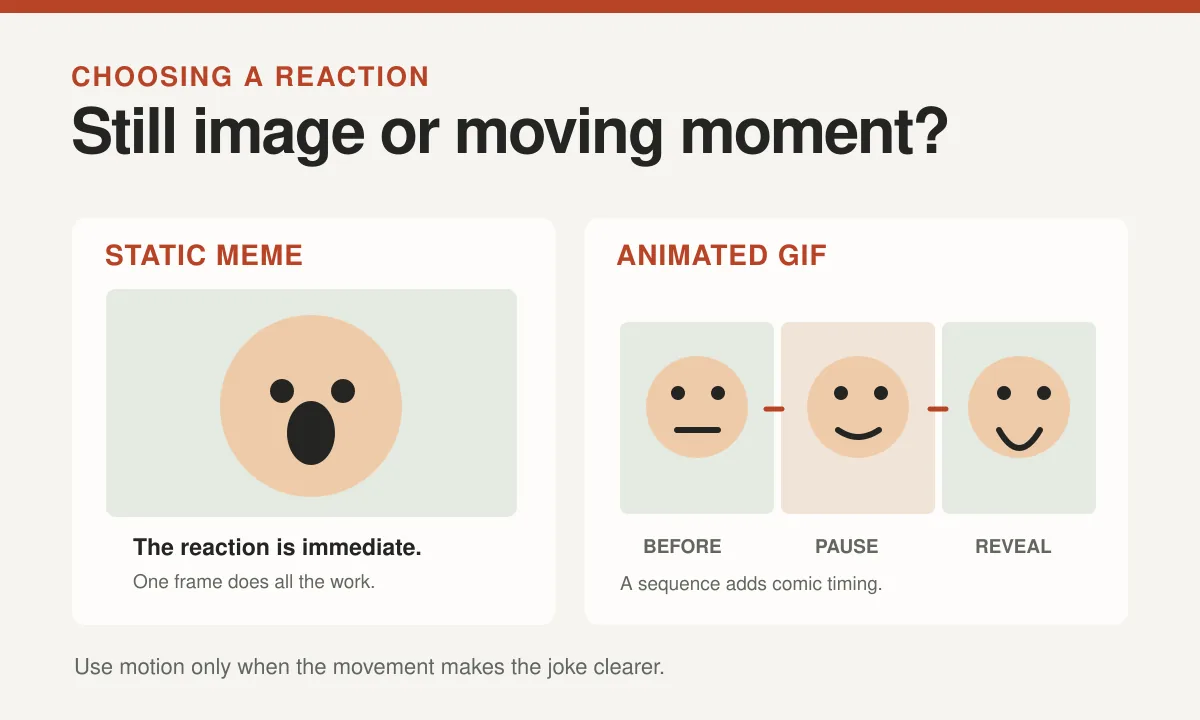
Static images appear quickly, can be understood at a glance and don't ask the reader to follow a sequence of movements. That makes them useful in fast-moving group chats.
Suppose somebody texts: "I left my keys in the fridge." An expression of deep concern from a cartoon character may be enough. The photo supplies the look. Your friend supplies the context.
A still picture can also be easier to revisit. The image remains visible while someone reads the caption and decides how to respond.
When a group contains people using older devices, unreliable connections or accessibility features, a clear static picture may be a more comfortable choice. You still need readable text and meaningful image descriptions where the platform supports them.
Use a GIF when movement is the punchline
A GIF earns its place when the action adds meaning. A long, slow head turn conveys gradually dawning disbelief. A small celebratory dance expresses joy in a way a frozen frame might not capture.
That sequence creates comic timing. The reaction unfolds while the reader watches, which can make it feel like the character is responding in real time.
Consider a friend revealing the final detail of a chaotic story. A GIF showing someone cautiously putting their glasses on may add a second beat of recognition.
But a loop can also become repetitive. If it runs continuously beside a serious conversation, even a charming dancing animal may eventually seem determined to dominate the meeting.
A simple check: does the movement deliver the joke, or is it merely moving because the file can?
Read the room before pressing the button
A dramatic GIF can look cheerful in one context and dismissive in another. If somebody is telling you about a personal disappointment, a character collapsing with laughter is probably not the response they hoped for.
Choose the emotional tone before the file format. A warm image of encouragement may work better than an animated eye roll, regardless of how perfectly the eye roll is performed.
Our guide to choosing a sweet or sarcastic reaction helps make that call.
Relationship matters as well. Close friends may understand a deliberately exaggerated reaction immediately. In a new work chat, a simple expression paired with a sentence gives everyone more context.
If you feel the urge to explain that your GIF isn't actually insulting, look for a different reaction.
Consider readability and accessibility
A still meme can be difficult to read when the caption is tiny or placed across a busy background. A GIF can be difficult when text flashes too quickly to follow or when important information appears only for a moment.
For both formats, make the message understandable without relying on microscopic text. If the joke includes words, provide them in an accessible form when possible.
The W3C images tutorial explains that text alternatives should convey the relevant information or function of an image. For a meaningful animation, describe the action that carries the reaction, not just its first frame.
Avoid flashing effects and consider people who are sensitive to movement. A static version or accessible platform controls may make the joke more comfortable to experience.
Our alt text guide for funny images gives examples for still reactions and short sequences.
| Consideration | Static meme | Animated GIF |
|---|---|---|
| Timing | Meaning is visible immediately | A sequence can create suspense |
| Readable text | The viewer can take their time | Captions may appear too briefly |
| Movement sensitivity | No looping movement | Consider motion comfort and alternatives |
| File size and loading | Often easier to deliver quickly | Can be larger or converted by platforms |
The technical side of sharing
File size and compatibility can affect what actually reaches your friend. A large animated file may load slowly or be compressed by a messaging app. Some platforms convert GIFs into video-style animations behind the scenes.
Don't assume every person sees the exact version you previewed. The platform may crop a thumbnail, delay playback or remove sound from a video that you thought was a GIF.
A static reaction works well when you need predictable display. An animated one earns its extra weight when the movement makes the moment funnier.
If the entire punchline depends on a few words that appear for only half a second, a caption outside the media can help.
And remember that both stills and GIFs may contain copyrighted material. Their widespread use does not mean every file is free to republish commercially.
Build a small reaction set for both moods
You don't need a separate animation for every emotion known to humanity. Organize a few favorites around useful purposes: delight, confusion, playful suspicion, sympathy and understated approval.
Choose still images that communicate a feeling immediately. Keep GIFs for reactions that genuinely benefit from a pause, movement or gradual reveal.
Our guide to organizing reaction images on your phone explains how to find those favorites without excavating your camera roll like a digital archaeologist.
If a friend consistently prefers text, use text. The best reaction is one that makes the other person feel understood, not the one that proves you have the most elaborate media library.
A quick preview can help too. If the image reads clearly in your phone's chat window, you're probably ready to share. If the punchline disappears when the preview gets smaller, choose a different crop or add a short text line outside the picture.
The winner is the reply that fits
A meme and a GIF can both be funny, warm or spectacularly mistimed. Static pictures deliver instant clarity; animations can add rhythm and an extra comic beat.
Think about the story, the recipient and the practical experience of seeing the media. If one still picture says everything, send it. If the joke depends on a perfectly timed stare, let the GIF perform.
Then return to the conversation. The stunned pigeon has expressed a complete opinion, and now your friend would probably like to finish explaining the restaurant incident.